
Install or repair 1AIVault MCP entries for
Install or repair 1AIVault MCP entries for newly supported AI clients.
Connect more AI tools to the same local vault through the Connection screen. 1AIVault now includes MCP installers and tool identity for GitHub Copilot, Roo Code, Qoder, Trae, Factory Droid, Kilo Code, Warp, and Augment, plus broader Cline CLI support.
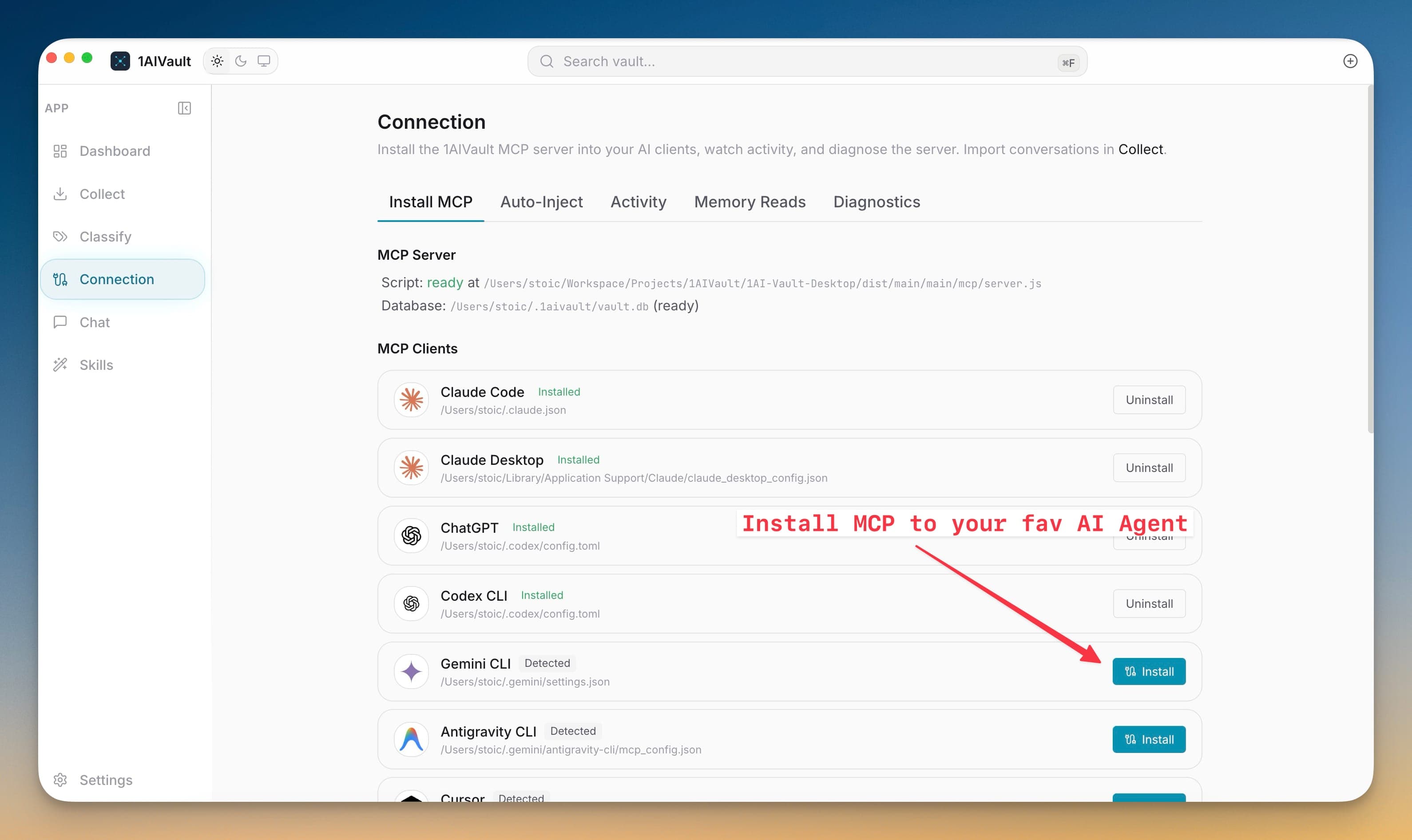
Connect more AI tools to the same local vault through the Connection screen. 1AIVault now includes MCP installers and tool identity for GitHub Copilot, Roo Code, Qoder, Trae, Factory Droid, Kilo Code, Warp, and Augment, plus broader Cline CLI support.
Every additional AI client becomes more useful when it can search, save, and reuse the same memory instead of starting fresh. Expanded MCP installers reduce the manual JSON editing needed to connect newer coding agents, and the Activity, Memory Reads, Auto-Inject, and Diagnostics tabs show whether those clients are actually using the vault.
Install or repair 1AIVault MCP entries for newly supported AI clients.
See installed, detected, and missing connection states from one MCP client list.
Preview Auto-Inject context before managed memory is written into tool startup files.
Audit connection activity, memory reads, server paths, and diagnostics from the Connection workspace.
Open 1AIVault and go to the relevant workspace.
Use More AI Tool Connections as part of your capture, classify, recall, and connect workflow.
Reuse the resulting memory across your connected AI tools.
GitHub Copilot, Roo Code, Qoder, Trae, Factory Droid, Kilo Code, Warp, and Augment now have connection support, alongside the existing Claude, Codex, Gemini, Cursor, Cline, OpenCode, ChatGPT, Windsurf, and Antigravity paths.
It writes the 1AIVault MCP server entry into the client’s supported config file, using the installer for that specific tool instead of asking you to hand-edit JSON.
Use Connection > Memory Reads to inspect recent MCP reads, or Connection > Activity to review tool events and connection actions.
Install the MCP bridge for Claude Desktop, Claude Code, Cursor, Cline, and Codex without hand-editing JSON. The Connection view writes the config, runs a diagnostic, and confirms the link is alive.
Learn moreDiagnostics check server script availability, vault database access, and client setup before troubleshooting starts.
Learn moreExisting Claude Desktop, Claude Code, Cursor, Cline, Codex, ChatGPT, and OpenCode connections can be refreshed before stale settings break.
Learn moreStart free, import real conversations, and reuse your memory across every AI agent you already use.