
Check total memories, topics, sources, and today’s
Check total memories, topics, sources, and today’s new entries from the Dashboard.
See your AI memory vault as a live workspace instead of a static list. The redesigned Dashboard, global search, activity heatmap, Settings, Skills, and Chat surfaces show memory totals, source coverage, recent activity, and reusable instructions in one consistent interface.
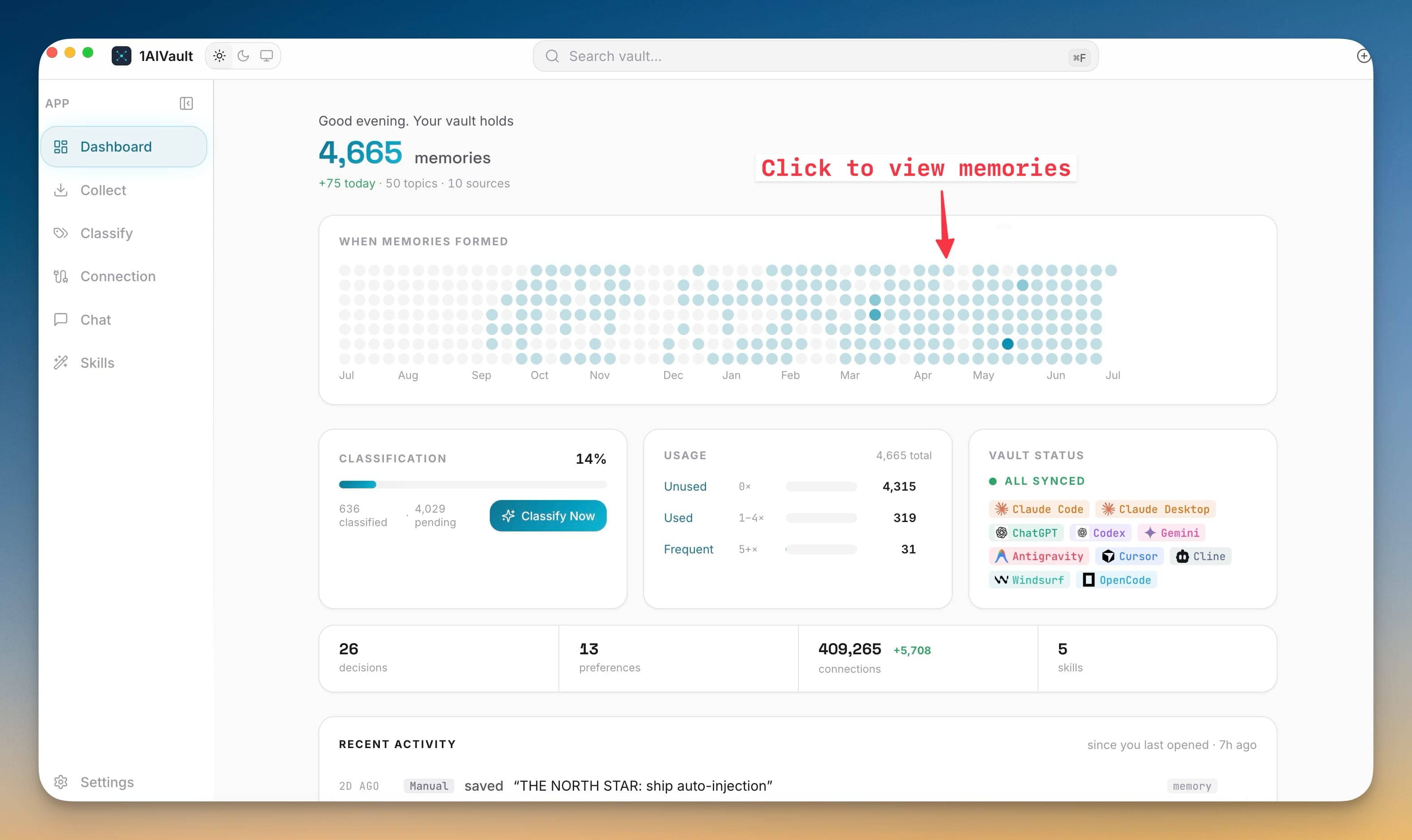
See your AI memory vault as a live workspace instead of a static list. The redesigned Dashboard, global search, activity heatmap, Settings, Skills, and Chat surfaces show memory totals, source coverage, recent activity, and reusable instructions in one consistent interface.
When a vault grows across Claude Code, Codex, ChatGPT, Cursor, Cline, and other tools, you need to know what exists before you ask an assistant to use it. The new interface puts memory count, topics, sources, classification progress, activity by day, search previews, and operational settings where you can act on them without opening separate views first.
Check total memories, topics, sources, and today’s new entries from the Dashboard.
Click activity heatmap days to open the memories formed on that date.
Preview matching memories from the top search field before opening full results.
Review Settings, Skills, Chat, Memory Reads, and update state through the same visual system.
Open 1AIVault and go to the relevant workspace.
Use Neural Vault Interface as part of your capture, classify, recall, and connect workflow.
Reuse the resulting memory across your connected AI tools.
The Dashboard now emphasizes memory totals, topic and source counts, an activity heatmap, classification status, source chips, and recent activity. Other workspaces share the same tabs, controls, empty states, and motion.
Yes. The activity heatmap can open entries for a selected day, quick actions jump to Classify and Collect, and the top search field previews matching vault memories.
No. It changes the interface around the local vault; your memory remains local and continues using the same vault database and connected-tool workflows.
Save memories, decisions, preferences, facts, and skills once — every connected AI client recalls them through a single MCP server. Local-first by default; nothing leaves your machine unless you export it.
Learn moreEntry detail keeps user, assistant, system, tool, and terminal-style messages when the source provides full conversation shape.
Learn moreFree mode supports 2,000 entries and 50 topics. Pro removes those caps and unlocks encrypted vault transfer.
Learn moreStart free, import real conversations, and reuse your memory across every AI agent you already use.