
Live timeline grouped by MCP call so
Live timeline grouped by MCP call so you can see which memories each call returned
A per-call timeline of every MCP read from Claude Desktop, Claude Code, Cursor, Cline, and Codex — with empty calls flagged as vault gaps and a Top Contributors sidebar ranking the memories your AI tools reach for most.
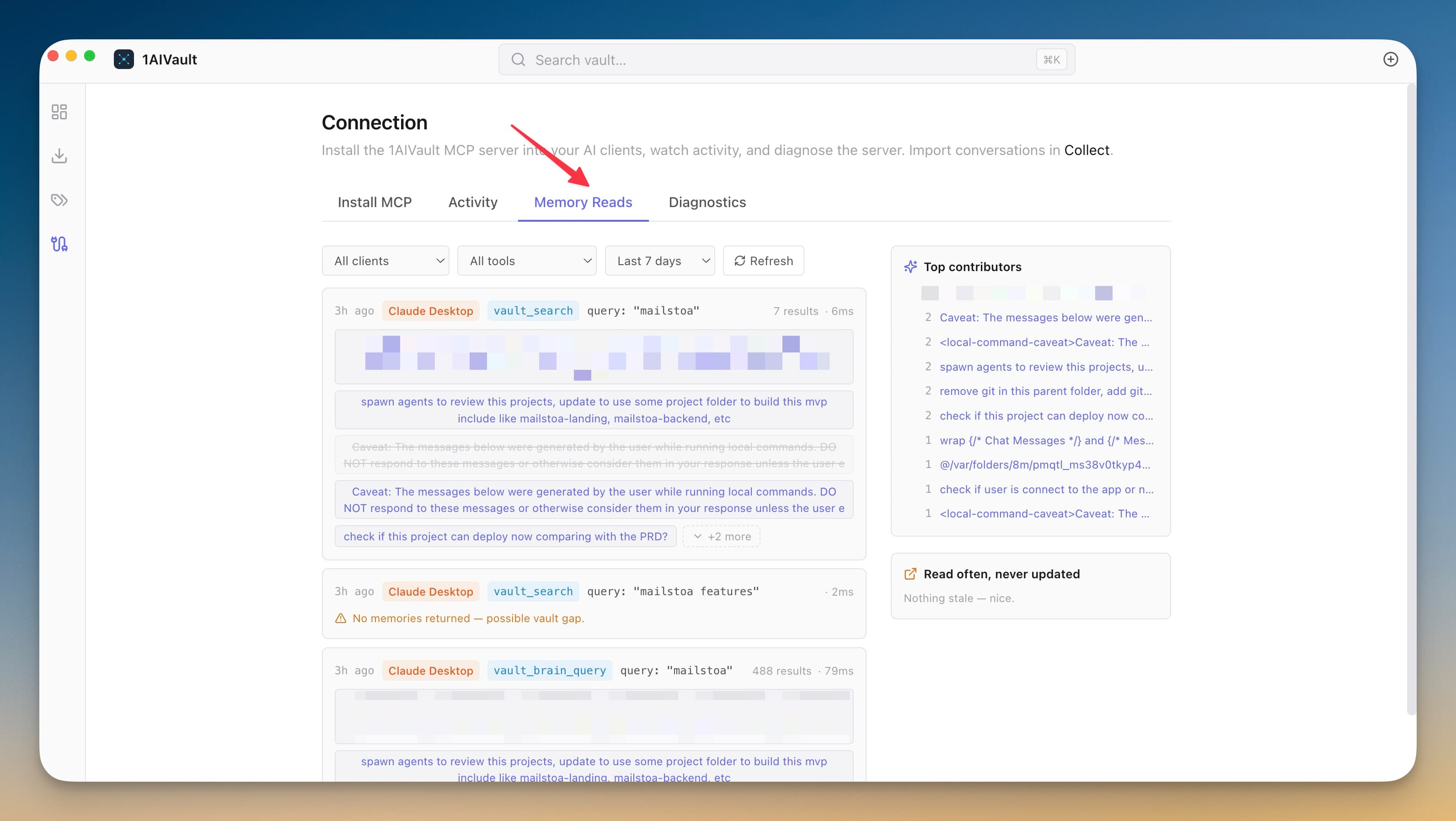
A per-call timeline of every MCP read from Claude Desktop, Claude Code, Cursor, Cline, and Codex — with empty calls flagged as vault gaps and a Top Contributors sidebar ranking the memories your AI tools reach for most.
The activity feed tells you the AI is reading; Memory Reads tells you what it's reading and what it failed to find. Empty calls become a shopping list for memories worth writing next.
Live timeline grouped by MCP call so you can see which memories each call returned
Per-call entry chips — click to jump to the memory in the entry detail view
'No memories returned' calls highlighted in amber as possible vault gaps
Top Contributors sidebar ranks the memories pulled most often this week
Connect an AI client over MCP and let it search or save memory.
Open Connection → Memory Reads to see each call as a read card.
Filter by client, tool, source, or time window to answer a specific question.
Act on top-contributor and stale flags by pinning, updating, or re-importing.
By default it stores call metadata (client, tool, timestamp, returned entry IDs) plus a redacted version of the call arguments. Settings → Privacy lets you turn off argument capture entirely.
You choose in Settings → Privacy: 30 days, 90 days, 1 year, or forever. The background pruner enforces the window.
Amber means the call returned zero memories. The AI was reaching for context that doesn't exist yet — those are the gaps worth filling.
Dashboard view shows a vault summary plus a live activity feed of every read, write, and classification across all connected AI tools. Deep links via `aivault://` open the app from anywhere.
Learn moreEvery entry detail header shows 'Last used X ago by Source · Nx this week' so you know which AI tools are touching a memory and how often.
Learn moreLocal embeddings — via Xenova Transformers (ONNX), llama.cpp (GGUF), or a remote embedding API — so AI clients can recall memories by meaning, not just keywords.
Learn moreStart free, import real conversations, and reuse your memory across every AI agent you already use.