
Covers web-only chats
ChatGPT and Claude.ai sessions that never write a local file still make it into the vault through the extension.
Bring web-only ChatGPT and Claude.ai chats into the same vault as your CLIs.
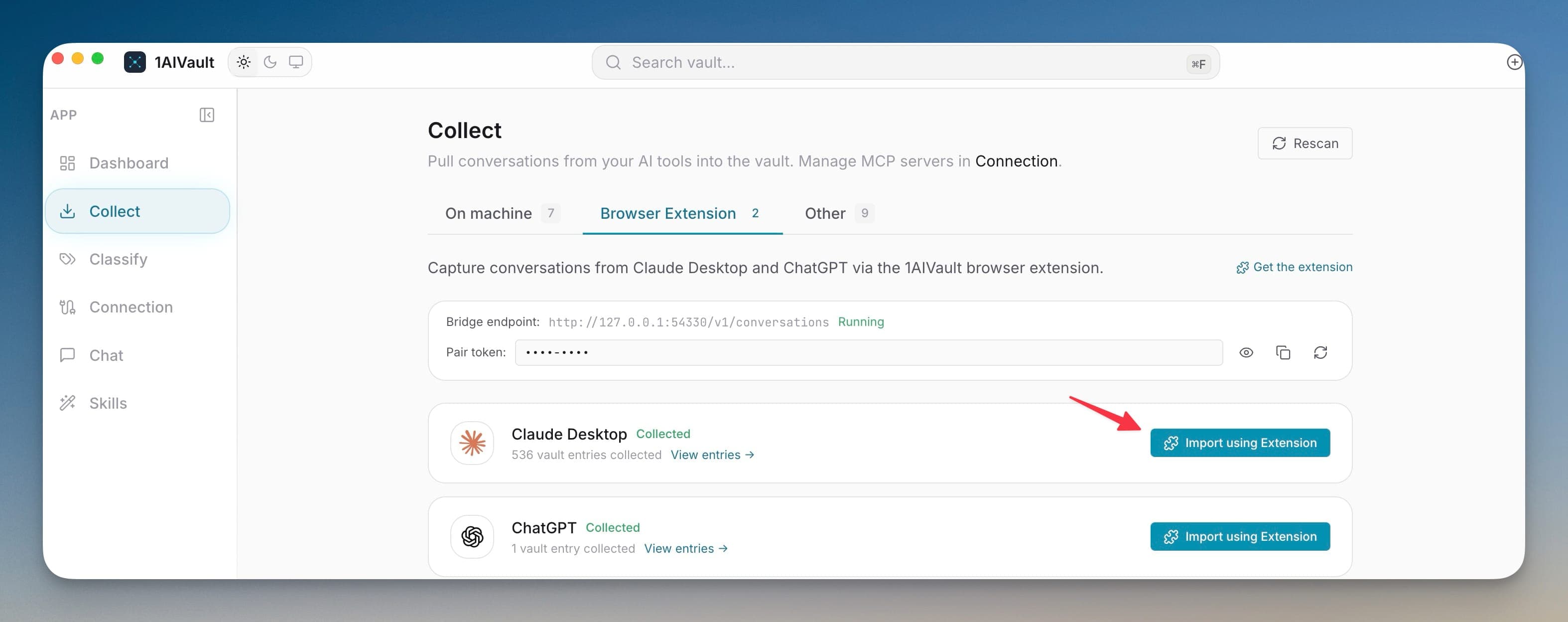
Some conversations never touch your disk. ChatGPT and Claude.ai web sessions live in the browser, so 1AIVault captures them through a companion extension instead of a file import. The extension reads a completed conversation and posts it to a small HTTP receiver running locally inside the desktop app, authenticated with a bearer token.
The Browser Extension tab exposes the local bridge details and the token the extension needs. Nothing routes through an external server — the receiver is on your own machine — so web chats join your CLI history in the same private vault. If captures stop arriving, regenerating the token usually restores the link.
ChatGPT and Claude.ai sessions that never write a local file still make it into the vault through the extension.
The extension talks to a receiver on your own machine using a bearer token, so captures never pass through an outside server.
Browser conversations sit beside imported CLI history, giving every AI chat a single searchable home.
Install the companion browser extension.
Open the Collect Browser Extension tab to read the local bridge details.
Copy the bridge token into the extension.
Let finished ChatGPT and Claude.ai conversations flow into the vault while the app is running.
Yes. The companion browser extension captures completed web conversations and sends them into the desktop app's local receiver so they land in the vault.
Confirm the desktop app is running, then regenerate or re-check the bridge token on the Browser Extension tab so the extension can reach the local receiver.
Pull existing chat history from Claude Code, Cursor, Cline, Codex, plus ChatGPT and Claude.ai via the paired browser extension. A live watcher keeps new sessions flowing into the vault as they happen.
Learn moreCapture Claude Code and Codex sessions sooner while 1AIVault is running, with next-launch recovery when the app was closed.
Learn moreCollect can rescan detected tools, import all available conversations, and refresh source availability from one workspace.
Learn moreStart free, import real conversations, and reuse your memory across every AI agent you already use.