
Jul 17, 2026
See How Your AI Recalls Your Memory — and Let It Improve While You Sleep
Neuron replays every memory your AI tools recall so you can see what they used and why, while Dreaming consolidates your vault overnight — all on your machine.
You gave every AI tool the same memory. You imported your conversations, let them classify into topics, and wired up MCP so Claude Code, Codex, Cursor, and the rest could pull from one vault. And then you had to take it on faith. When an answer came back thin, you couldn't tell whether your AI ignored the vault, searched it and found nothing, or found the right memory and buried it under three wrong ones. The vault was a black box, and the only signal you got was the quality of the reply.
Two other things quietly worked against you. As the vault grew past a few thousand entries, keyword search started missing memories that were phrased differently from how you asked. And every week of imports left a little more sediment behind — near-duplicate entries, half-tagged topics, links that were never drawn — that nobody had time to clean up.
The v1.11.0 release, "Memory That Thinks," goes after all three. It gives you a window into every recall your AI tools run, teaches search to match on meaning, and lets your vault consolidate itself overnight.
What changed
Two new capabilities anchor this release. Neuron is a new screen that records every memory search your connected AI tools run against the vault and lets you replay it — so you can see exactly what was searched, which memories were considered, which were dropped, and which made it into the reply. Dreaming lets your vault consolidate itself on a schedule: while you sleep, your own AI CLI reviews clusters of related memories, merges duplicates, fixes tags, and links what belongs together.
Underneath Neuron, recall itself got smarter — searching now matches on meaning instead of just words, all on your machine.
How it works in practice
Replay any recall, stage by stage
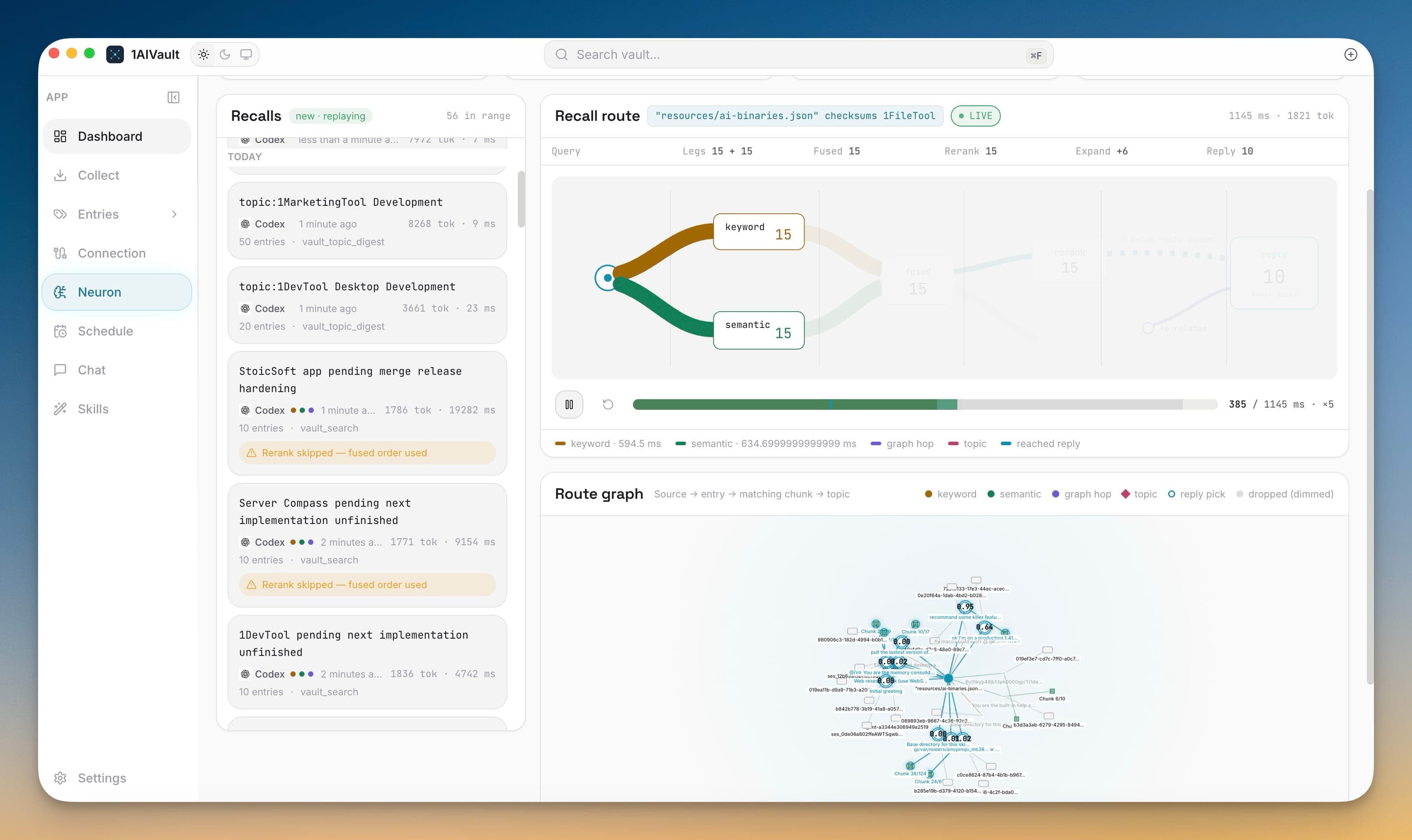
Open the new Neuron tab and you get a live feed of Recalls — every search your AI tools have run, newest first, each tagged with its source (Codex, Claude Code, and so on), the tokens it returned, and how long it took. Select one and the Recall route plays back on the right: the query fans out into a keyword leg and a semantic leg, the results fuse, get reranked, expand to pull in related context, and land on the final reply. A scrubber lets you scrub the whole route in slow motion, so "did my AI use my memory, and why that one?" stops being a guess.
Inspect why one memory won and another lost
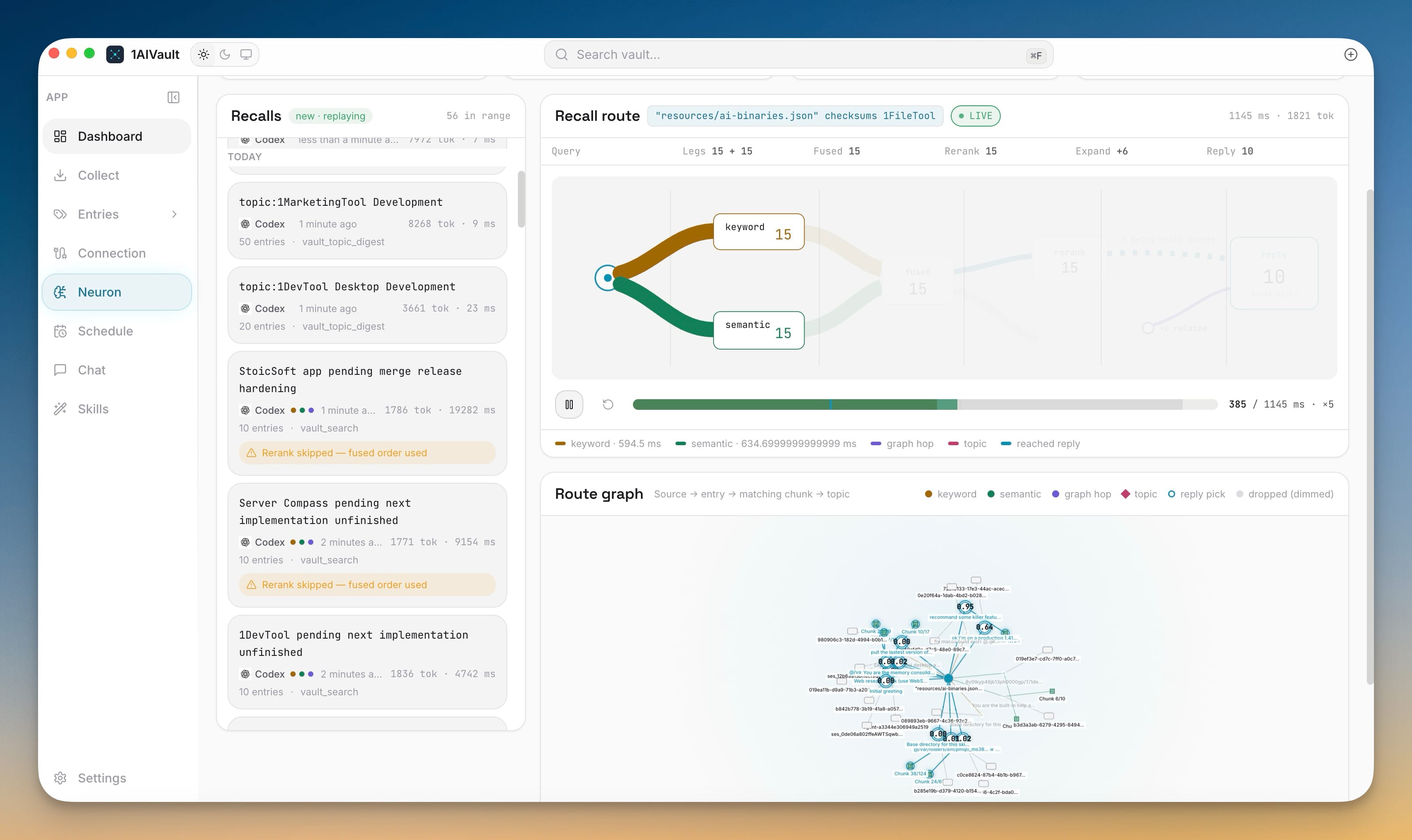
Click into any recall and the Trace inspector opens with a stage waterfall — embed, keyword, k-NN, rerank — showing where the time went, and a candidate table underneath. Every memory that was considered is listed with its BM25 score, cosine distance, rerank score, and a route verdict: reply if it made the answer, dropped if it didn't. At the bottom you see the recovery the client actually received and an estimate of how many tokens were avoided by returning a lean result instead of raw text. When a recall disappoints, this is where you find out it was a vault gap, not an AI mistake.
Follow the route from question to memory
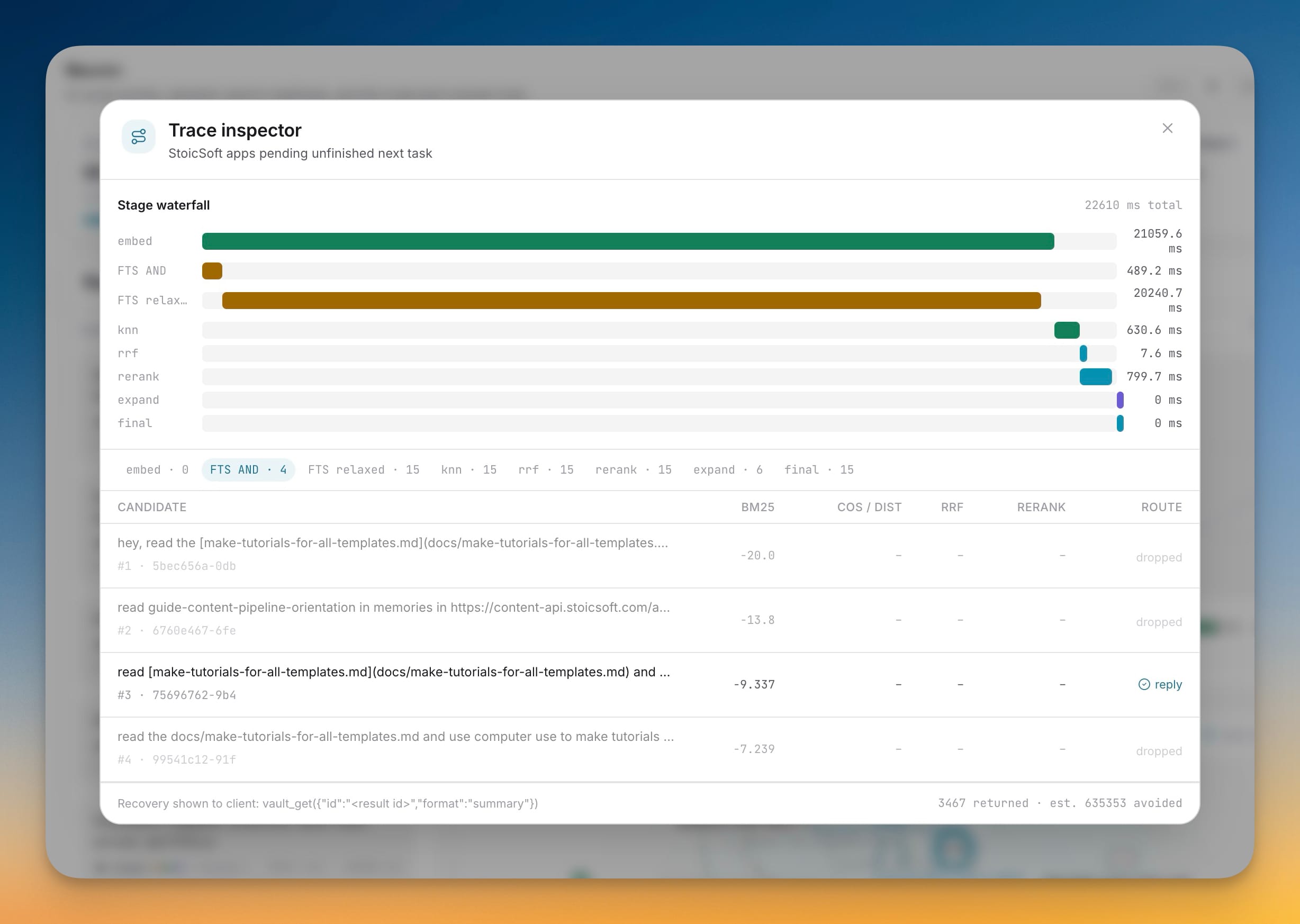
For the bigger picture, the Route graph draws the whole path — from your question, out to the entries it matched, down to the specific chunk inside each one, and across to the topics that tie them together. Keyword and semantic hops are colored differently, reply picks are circled, and dropped candidates fade into the background. It's the fastest way to see which corner of your vault an answer actually came from.
Recall that understands meaning, not just words
The reason recall got so much more legible is that it got smarter. Semantic recall now finds the right memory even when you phrase the question completely differently from how the memory was written. Long conversations are searched passage by passage, so a match points at the sentence that matters instead of the whole transcript, and related memories are pulled in automatically as extra context. Results come back far leaner, so your AI tool spends its context window on answers instead of raw text.
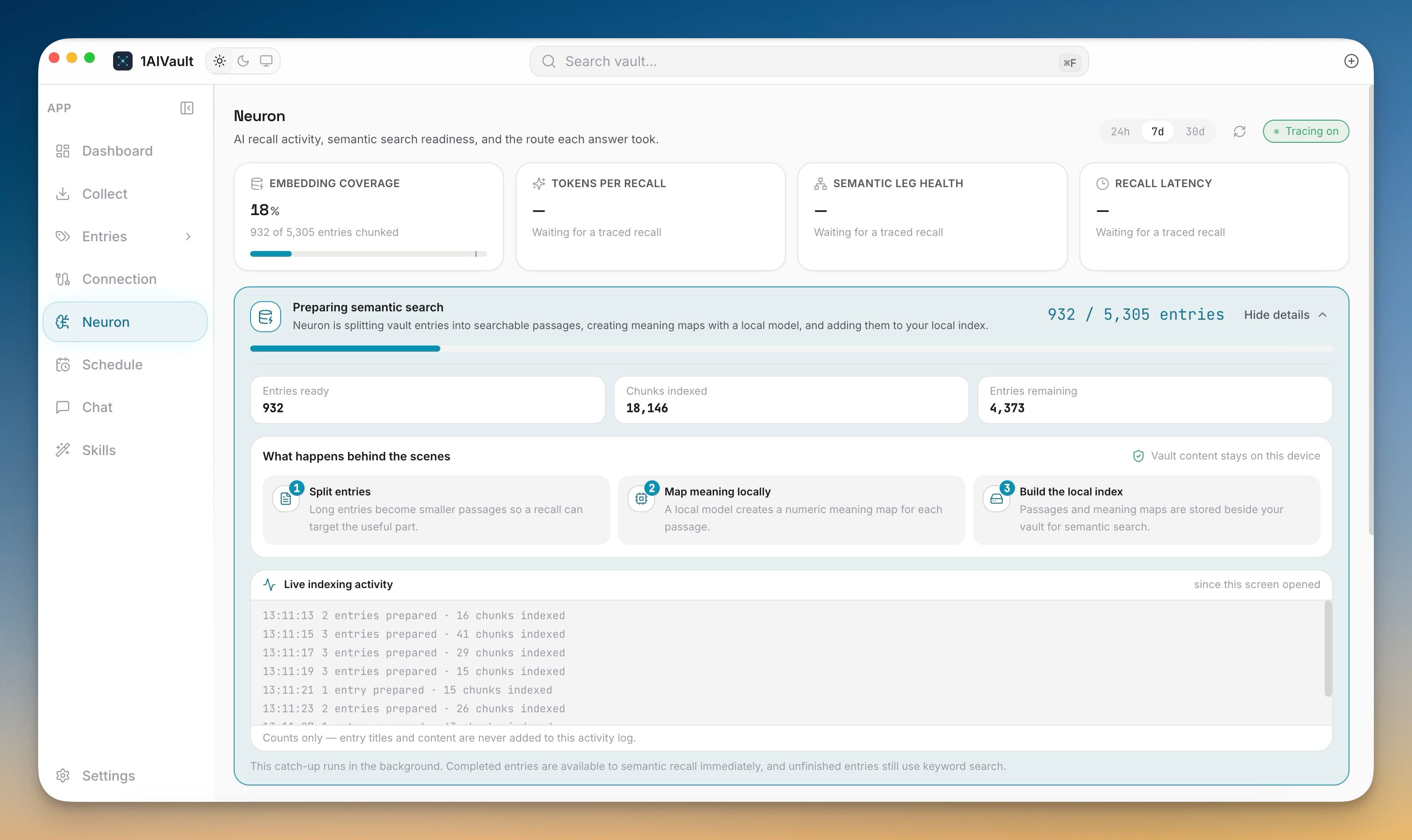
All of it runs on your machine. Neuron splits your entries into searchable passages, builds a numeric meaning map for each one with a local model, and stores everything beside your vault — vault content never leaves your device. You can watch the catch-up happen: Embedding coverage ticks up as entries are chunked, and stat cards for tokens per recall, semantic leg health, and recall latency fill in as traced recalls come through. Completed entries are searchable by meaning immediately; anything still in the queue keeps using keyword search, so nothing breaks while it works.
Let your vault dream
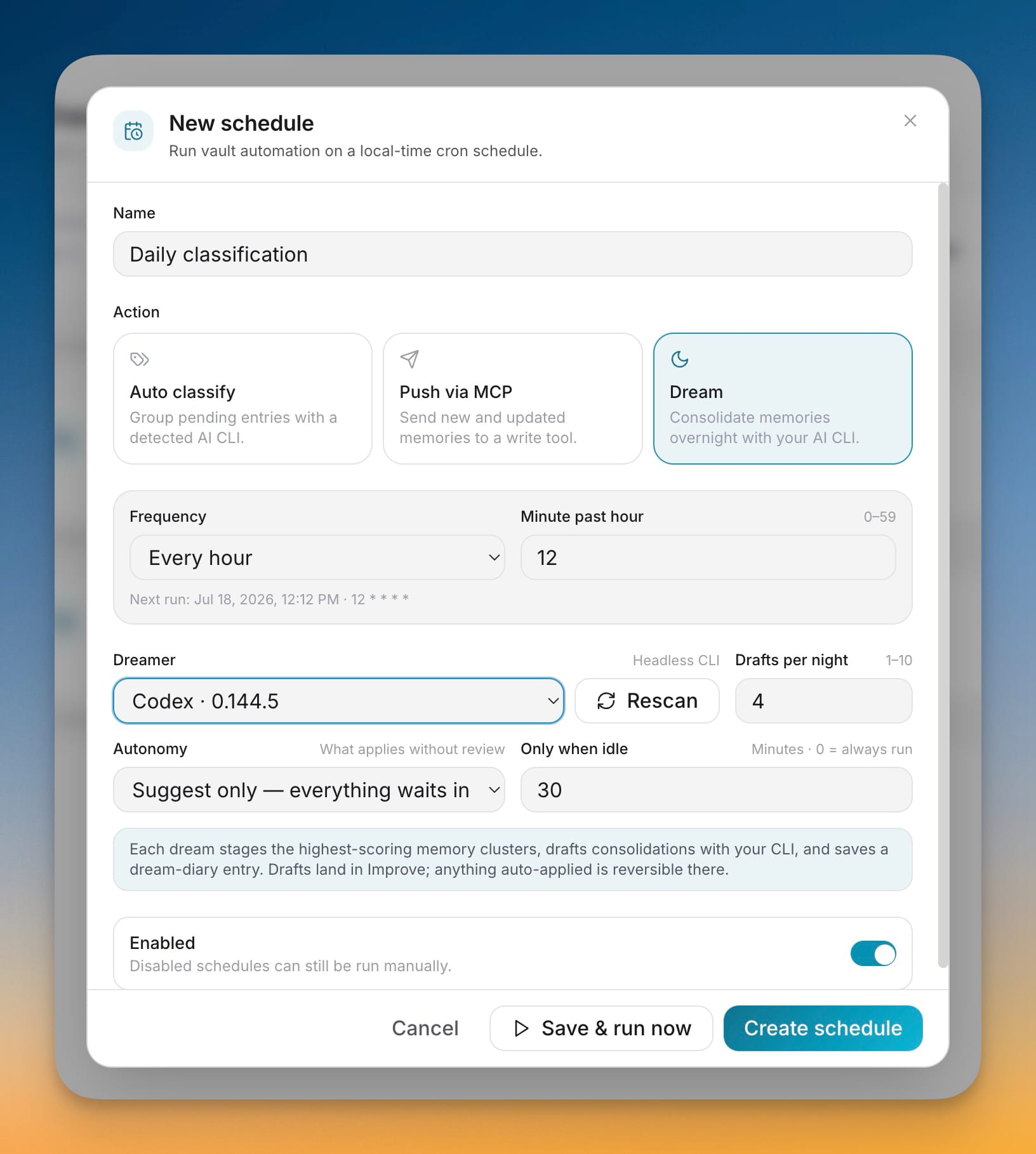
The other half of "memory that thinks" runs while you aren't watching. Open Schedule, create a new schedule, and pick the Dream action — "consolidate memories overnight with your AI CLI." You choose which installed CLI does the thinking (the Dreamer), how many drafts it may prepare each night, and how much freedom it gets: suggest only, where everything waits for your review; safe changes, where low-risk cleanups like retagging and linking apply automatically; or full autonomy. An only-when-idle threshold keeps it from running while you're at the keyboard.
Each dream stages the highest-scoring memory clusters, drafts consolidations with your CLI, and saves a dream-diary entry you'll find on the Dashboard the next morning — showing what was reviewed, what was drafted, and what was applied. Anything it applies lands in Improve and is a single undo away. Merges, forgets, and skill changes always wait for you, no matter the autonomy level.
Before vs after
| Before v1.11.0 | With v1.11.0 | |
|---|---|---|
| Did my AI use my memory? | Guess from the reply | Replay the exact recall in Neuron |
| Why did it pick that memory? | No way to tell | Candidate scores + route in the Trace inspector |
| Search phrased differently than the memory | Often missed | Semantic recall matches on meaning |
| Long conversations | Whole transcript returned | Searched passage by passage |
| Duplicate and mis-tagged entries | Manual cleanup, or never | Consolidated overnight by Dreaming |
Who benefits most
Power users with large vaults finally get a coverage meter and latency numbers instead of a vague sense that recall is "slower now" — and Dreaming keeps thousands of entries tidy without a weekend of manual grooming.
Anyone debugging a disappointing answer can stop blaming the model. Neuron shows whether the right memory existed, was found, and was chosen — turning "the AI is dumb" into "that's a vault gap I can fix."
Privacy-conscious users get all of it locally: passages, meaning maps, and traces are stored beside the vault, and the indexing activity log records counts only — never your entry titles or content.
Try it
Update to v1.11.0, open the Neuron tab, and ask one of your connected AI tools a question you know is in the vault. Watch the recall replay, then open the Trace inspector to see which memory won. When you're ready, set up a nightly Dream in suggest-only mode and check the dream diary in the morning. Your memory just stopped being a black box — and started taking care of itself.